
We've all been there—after a fresh salad, spinach, or broccoli lunch, wondering: "Do I have something stuck between my teeth?"
Asking tablemates feels awkward, so you lick your lips nervously and smile cautiously.
The afternoon meeting looms tensely, especially without a pocket mirror handy.

As seasoned iPhone users know, iPhone 5, 4S, or 4 owners have a built-in fix: the front-facing camera doubles as a reliable mirror for smile checks.
Here's how to activate it fast and restore confidence before key appointments.
From the lock screen, launch the camera with one swipe—no full unlock needed.
Press the Home button or Power button to wake your iPhone.
Spot the camera icon bottom-right? Swipe up on it.

Tada! Camera's on instantly.
Switch to front camera by tapping the icon top-right—now inspect your smile (enhanced with baking soda whitening, perhaps).
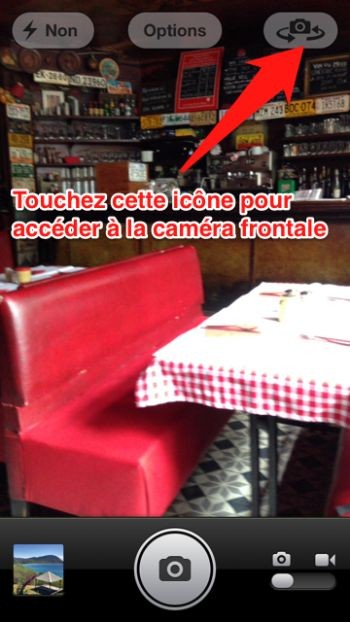
You see yourself clearly; it's designed that way. Wipe your screen for a crisp view—no apps required.
Perfect for subway rides, buses, taxis, cafes, parties, or meetings—your iPhone mirror goes everywhere.
Great for teeth checks, hairstyles, or makeup touch-ups on the go.

Ever panicked over food in your teeth? Tried this trick? Share your stories in the comments.
